

To manage contacts, visit messenger.cogfy.com/:WORKSPACE/contacts.
Create a contact manually
1
Click on the 'Create' button
This action immediately creates an empty contact.
2
Click on the 'Edit' button
Click the edit button to set the contact’s properties. Add the phone number in the “phone” field—this way, when the person sends a message, the pre-registered contact will be updated with information received from WhatsApp.
Import multiple contacts
You can import multiple contacts at once using a CSV file1
Click on the 'Import from CSV' button
This action opens a dialog for uploading a CSV file.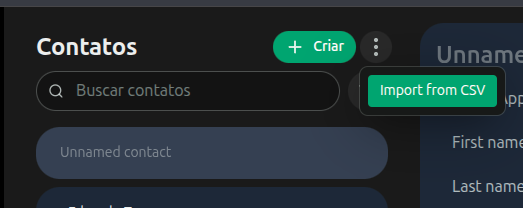
2
Download the sample CSV file
Click the download button to get a sample CSV file. Use this file to format your contact data correctly before importing it.
3
Click on 'Choose File' and select your CSV file
Click the ‘Choose File’ button to select your formatted CSV file for import.
4
Click on 'Upload' to import the contacts
Click the ‘Upload’ button to import the contacts from your CSV file.